



Most shelters don't fail municipal reporting because their data is bad. They fail because the export doesn't match what the receiving system expects — a date formatted as MM/DD/YY when HMIS wants YYYY-MM-DD, a free-text breed field where animal control wants a controlled code, or a column header spelled intake_dt when the import spec says IntakeDate. The data is fine. The shipping is broken.
This is the companion piece to our lightweight shelter data governance standard. That post covered the taxonomy and ownership matrix. This one hands you the runnable parts: actual CSV headers you can paste, a machine-readable data dictionary, redaction patterns for the PII you're not allowed to send, and a Python snippet that fails loudly before the file leaves your building.
Everything here assumes a small team. Sometimes a team of one.
Start with the destination, not your database
The mistake that burns the most hours: building the export around what your shelter software spits out natively, then discovering the municipal target wants something completely different. You end up hand-editing CSVs in Excel at 9pm the night before the deadline.
Flip it. Pull the target's import spec first. For most small-shelter reporting you're hitting one of two destinations:
-
Human services / HMIS-style systems — when your shelter also serves people (pet retention programs tied to housing, co-sheltering during displacement, surrender-prevention case notes that feed a Continuum of Care). These are strict about PII and element definitions.
-
Animal-control / county reporting — intake and outcome counts, stray hold compliance, bite/quarantine records, rabies reporting.
They want different shapes. Build two separate export templates and never try to make one file serve both. The teams that get rejected most often are the ones who tried to ship a single "master export" to everyone.
Copy‑paste CSV header templates
Paste these directly. Keep the header row exactly as written — casing and underscores matter because the receiving parser is usually case-sensitive.
Streamline your shelter operations effortlessly.
Animlly helps you manage every pet, volunteer, and adoption step with ease and accuracy.
- Comprehensive pet profiles
- Volunteer scheduling & communication
- Adoption tracking & reporting
No credit card required
Animal-control intake/outcome export
recordid,species,breedcode,sex,alteredstatus,intakedate,intaketype,intakezip3,strayholdend,outcomedate,outcometype,outcomezip3,microchippresent,rabiestagpresent
AC-2026-000481,DOG,LAB-MIX,M,NEUTERED,2026-03-02,STRAY,940,2026-03-07,ADOPTION,941,Y,Y AC-2026-000482,CAT,DSH,F,INTACT,2026-03-04,,RTO,940,N,N AC-2026-000483,DOG,PIT-MIX,U,UNKNOWN,2026-03-05,CONFISCATE,938,2026-03-12,EUTHANASIA,938,Y,Y
Note the zip3 fields — that's a redaction pattern, not a typo. More on that below. The point is your template bakes redaction into the header design so no one has to remember to strip it later.
HMIS-style human-services export (pet-retention / co-sheltering)
enrollmentid,clienthash,householdsize,projectentrydate,projectexitdate,exitdestination,petcount,servicetype,referralsource,countyfips
EN-0098,8f3a1c...e21,3,2026-02-10,2026-02-24,RENTALNOSUBSIDY,2,PETDEPOSITASSIST,ANIMALCONTROL,06075 EN-0099,b7d9e4...a08,1,2026-02-12,,,1,SURRENDERPREVENTION,SELF,06075
The client_hash field is deliberately not a name, DOB, or SSN. If your human-services partner requires a real HMIS Personal ID, that mapping lives in their system under their data-use agreement — not in your flat file.
Compact machine-oriented data dictionary
This is the part that saves you during a rejection. When the county emails back "field 7 invalid," you want one lookup table that tells you exactly what's allowed. Keep this as a CSV in the same folder as your export script so validation reads from it directly.
| field_name | type | required | allowed_values | sensitivity | validation_rule | sample |
|---|---|---|---|---|---|---|
| record_id | string | yes | pattern AC-YYYY-NNNNNN | low | regex ^AC-\d{4}-\d{6}$ | AC-2026-000481 |
| species | enum | yes | DOG, CAT, OTHER | low | in allowed set | DOG |
| breed_code | string | no | controlled list | low | lookup in breed_codes.csv | LAB-MIX |
| sex | enum | yes | M, F, U | low | in allowed set | M |
| altered_status | enum | yes | NEUTERED, SPAYED, INTACT, UNKNOWN | low | in allowed set | NEUTERED |
| intake_date | date | yes | ISO date | low | YYYY-MM-DD, not future | 2026-03-02 |
| intake_type | enum | yes | STRAY, OWNERSURRENDER, CONFISCATE, TRANSFERIN, RETURN | low | in allowed set | STRAY |
| intake_zip3 | string | yes | 3-digit prefix | medium | regex ^\d{3}$ | 940 |
| strayholdend | date | no | ISO date | low | ≥ intake_date | 2026-03-07 |
| outcome_type | enum | no | ADOPTION, RTO, TRANSFER_OUT, EUTHANASIA, DIED, MISSING | low | in allowed set | ADOPTION |
| microchip_present | enum | yes | Y, N | low | Y or N | Y |
| client_hash | string | yes (HMIS) | 64-char hex | high | regex ^[a-f0-9]{64}$ | 8f3a1c… |
| household_size | integer | yes (HMIS) | 1–20 | medium | range check | 3 |
| county_fips | string | yes (HMIS) | 5-digit FIPS | low | lookup in fips.csv | 06075 |
The pattern that keeps causing problems: shelters skip the sensitivity column because "it's just for us." Then someone exports the high-sensitivity fields to a volunteer's personal laptop. That column exists to make sensitive fields visibly sensitive so your redaction step can key off it automatically. Don't treat it as optional documentation — treat it as an access control signal baked into the file itself.
PII redaction and aggregation patterns
Animal records feel harmless until you realize a surrender record plus a full ZIP plus a date is often enough to identify a specific household. For anything touching human services, treat it like medical data.
-
ZIP truncation — ship the 3-digit prefix, not the full 5. Keeps geographic reporting useful, kills household-level re-identification. (That's the
zip3in the templates.) -
One-way hashing for identifiers — never ship names or raw IDs to a partner file. Hash with a salt you keep private: -
client_hash = sha256(salt + lower(trim(name)) + dob)- Same person always produces the same hash, so your partner can dedupe without ever seeing the identity. -
Small-cell suppression — if an aggregated count would be fewer than roughly 5 in a category (e.g., euthanasia by a specific intake ZIP), suppress it or roll it up. Low counts are the easiest way to accidentally point at one family.
Anything marked
highsensitivity in the dictionary never appears in a file that leaves your network in plaintext.
A field-level rule of thumb that keeps teams out of trouble: anything marked high sensitivity in the dictionary never appears in a file that leaves your network in plaintext. If it has to travel, it travels hashed or aggregated.
The four‑role RACI — and how one person covers all four
Even if you're the only person doing this, the roles still exist. You're just wearing all the hats. Naming them matters because when something breaks, you need to know which hat failed.
| Task | Data Owner | Preparer | Validator | Submitter |
|---|---|---|---|---|
| Approve what fields get shared | A | C | I | I |
| Pull & format the export | C | R | I | I |
| Run validation against the dictionary | I | C | R | I |
| Send to the municipal portal | I | I | C | R |
| Sign off that it went through | A | I | I | R |
A = Accountable, R = Responsible, C = Consulted, I = Informed.
Cross-coverage for one-person teams
-
Prepare the file in the morning.
-
Run validation in the afternoon, after lunch, with the dictionary open — pretend you're auditing a stranger's file.
-
Never submit the same hour you prepared. Deadline pressure is exactly when the
intake_dtvsIntakeDateerrors slip through.
For two-person teams, the fix is simpler: whoever didn't pull the data runs validation. That single swap catches most formatting errors before submission.
Step-by-step export checklist
Specs drift quietly. The destination adds a field, retires a code, or silently changes a date format between cycles. Following a consistent order every time is what keeps that from becoming a surprise on submission day.
-
Pull the current import spec from the municipal target. Diff it against last month's — specs change quietly.
-
Generate the raw export from your shelter software into a staging folder, not your submission folder.
-
Apply redaction (ZIP truncation, hashing, small-cell suppression) before anything else touches it.
-
Run automated validation against the data dictionary (script below). Do not open the file in Excel first — Excel silently mangles leading zeros in FIPS codes and ZIPs.
-
Review the error log. Zero errors or you don't proceed.
-
Generate the metadata block (below) and save it alongside the file.
-
Submit through the official portal.
-
Archive the submitted file + metadata + validation log together, read-only.
Tooling recommendation, kept boring on purpose: Python with pandas and csv for generation and checks, csvlint or frictionless for schema validation, and a plain private git repo for versioning the templates and dictionary. Nothing heavier is necessary.
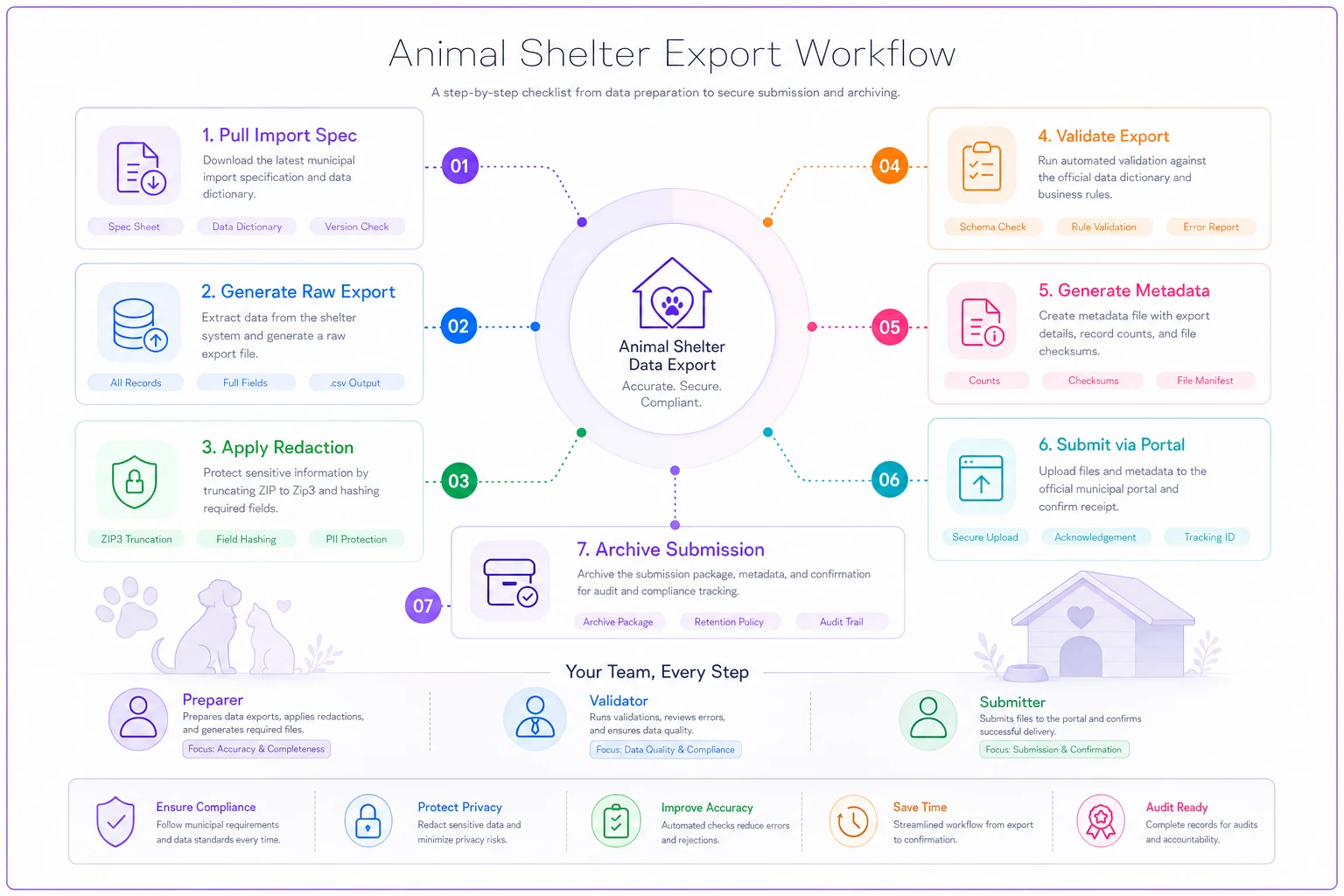
The visual shows the handoff points where a validator should check format and redaction before submission.
Python snippet: generate and pre-send validation
This reads the data dictionary, validates every row, and refuses to write a submission file if anything fails.
import csv, re, hashlib, sys SALT = open(".salt").read().strip() # keep out of version control def hashclient(name, dob): raw = (SALT + name.strip().lower() + dob).encode() return hashlib.sha256(raw).hexdigest() def truncatezip(z): return str(z).zfill(5)[:3] # minimal rule set mirroring the data dictionary RULES = { "recordid": lambda v: re.match(r"^AC-\d{4}-\d{6}$", v), "species": lambda v: v in {"DOG", "CAT", "OTHER"}, "sex": lambda v: v in {"M", "F", "U"}, "intakedate": lambda v: re.match(r"^\d{4}-\d{2}-\d{2}$", v), "intakezip3": lambda v: re.match(r"^\d{3}$", v), "microchippresent": lambda v: v in {"Y", "N"}, } def validate(rows): errors = [] for i, row in enumerate(rows, start=2): # row 1 is header for field, check in RULES.items(): val = row.get(field, "") if not check(val or ""): errors.append(f"row {i}: '{field}'='{val}' failed") return errors with open("stagingexport.csv", newline="") as f: rows = list(csv.DictReader(f)) errs = validate(rows) if errs: print("VALIDATION FAILED — file not written") print("\n".join(errs[:50])) sys.exit(1) with open("submissionready.csv", "w", newline="") as f: writer = csv.DictWriter(f, fieldnames=rows[0].keys()) writer.writeheader() writer.writerows(rows) print(f"OK — {len(rows)} rows validated and written")
The sys.exit(1) is the important line. It means the script cannot produce a submission file that failed validation. That's what protects you on a bad day when you're rushing to hit a deadline.
Data-quality audit routine
Validation checks structure. Audits check whether the data is true. Run these on a schedule, not just before a deadline.
| Check | Query (plain English) | Frequency | Acceptable error rate |
|---|---|---|---|
| Orphan outcomes | outcomedate present but no intakedate | Weekly | 0% |
| Impossible holds | strayholdend < intake_date | Weekly | 0% |
| Missing enums | species/sex blank | Weekly | < 1% |
| Future dates | any date > today | Before each export | 0% |
| Duplicate record_id | same ID twice | Before each export | 0% |
| Suspicious ZIP spread | > 95% of intakes share one zip3 | Monthly | investigate |
The one most shelters skip is "suspicious ZIP spread." If almost every record shows the same 3-digit ZIP, someone is defaulting the field instead of entering it. The export will pass structural validation perfectly and still be useless for the county's geographic planning. A file that validates clean and contains bad data is a harder problem to catch than one that outright fails — because nothing flags it.
Metadata block for every export
Ship a small sidecar file with each submission. When a question comes back six weeks later, this tells you exactly what you sent and how it was prepared.
exportid: AC-2026-03-R1 target: countyanimalcontrol schemaversion: 2.3 daterange: 2026-03-01 to 2026-03-31 rowcount: 318 redactionapplied: [zip3truncation, smallcellsuppression] preparedby: j.okafor validatedby: j.okafor (afternoon pass) validationlog: logs/2026-03run.txt submitted_at: 2026-04-02T14:10:00Z
Change-request and versioning template
Specs drift. The destination adds a field, retires a code, changes a date format. Track it or you'll spend an afternoon guessing why last quarter's file worked and this quarter's bounced.
CHANGE REQUEST -------------- id: CR-014 date: 2026-04-05 requestedby: county data liaison affected: animal-control export, breedcode change: county now requires FeLV/FIV status column for cats schemaversionbefore: 2.3 schemaversionafter: 2.4 action: add felineteststatus enum (POS,NEG,UNKNOWN,NOTTESTED) rollback: revert to 2.3 header, drop new column approvedby: data owner effective_export: 2026-05
Bump the schema_version in both the dictionary and the metadata block whenever a change request lands. That one number is how future-you reconstructs what a file was supposed to contain.
A real scenario
A roughly 40-kennel municipal-contract shelter was spending about half a day every month fixing export rejections — leading zeros stripped from FIPS codes, inconsistent date formats, the occasional full ZIP slipping through on surrender records. Two or three resubmissions per cycle was normal, and each round-trip with the county liaison ate another day of waiting.
They didn't buy anything. They wrote the data dictionary as a CSV, built the validation snippet above, and added the afternoon-validation rule so files never got submitted the same hour they were pulled. First clean month, zero resubmissions. By the third month the liaison stopped double-checking their files entirely. The time saved wasn't dramatic on paper — maybe half a day a month — but the deadline stress basically disappeared, which mattered more to the one person doing all four roles.
When this setup is overkill
If you submit counts once a year by typing numbers into a web form, you don't need a validation script. Build the dictionary anyway so the definitions are nailed down, but skip the tooling.
Where it earns its keep is any shelter submitting monthly or more, especially one touching human-services data where a redaction slip has real consequences. And if you're a one-person operation, the time-gap validation rule alone is worth adopting — not because you'll catch structural errors you'd otherwise miss, but because it forces the one moment of skepticism that deadline pressure tends to erase.
The destination defines the file. Build backward from their spec, let a script refuse anything broken, and keep the dictionary as the single source of truth. Do that and municipal reporting stops being the monthly fire drill and turns into something you barely think about.
Ready to enhance your shelter’s impact?
Join 500+ shelters using Animlly to improve care coordination, increase adoptions, and engage communities effectively.