


Your intake coordinator just called in sick. The volunteer covering the front desk has worked here exactly twice. Three dogs just arrived from a hoarding case, and there's a line of people waiting to surrender pets.
By noon, you'll have intake forms missing critical medical flags, behavior notes scribbled on sticky notes that'll disappear by tomorrow, and microchip numbers recorded wrong because someone typed while holding a squirming cat.
Shelter intake happens during chaos. Not in a quiet office with unlimited time. Building intake forms means balancing what you'd ideally capture against what actually gets filled out when someone's juggling four tasks at once.
Shelters either collect too much data (and staff skip fields) or too little (and miss critical safety flags). The sweet spot sits right in between — a minimum dataset that captures what you need for immediate care decisions, legal compliance, and future placement.
The non-negotiable fields that prevent operational disasters
A municipal shelter in Ohio had a beautiful 4-page intake form last year. Comprehensive. Thorough. Staff filled out maybe 40% of it during busy periods. A dog with a documented bite history got placed in general population because that field got skipped. The resulting incident cost them $14,000 in medical bills and nearly got their contract pulled.
Your core intake fields need to answer three immediate questions: Is this animal safe to handle? What medical attention is needed right now? How do we contact someone if needed?
Here's the absolute minimum dataset that keeps operations running:
Animal identification block:
-
Intake number (auto-generated if possible)
-
Date and time
-
Species/breed/color
-
Sex and altered status
-
Age estimate
-
Weight
Safety and medical flags:
-
Known aggression/bite history (YES/NO with details box)
-
Visible injuries or illness
-
Medications currently taking
-
Special handling requirements
Source information:
-
Intake type (stray/surrender/confiscate/transfer)
-
Found location (for strays)
-
Previous owner info (name, phone, email, address)
-
Surrender reason (if applicable)
Legal requirements:
-
Microchip scan result
-
Rabies tag number
-
License number
-
Hold type and release date
The trick is making these fields impossible to skip. One shelter in Arizona started highlighting their three critical safety fields in red and requiring supervisor override to save incomplete forms. Their injury rate dropped 60% in four months. Not because they collected more data — because they consistently collected the right data.
Paper versus digital collection strategies
Sometimes paper works better, even when you have digital systems. During a recent hoarding case intake, a shelter processed 47 cats in three hours. Their usual digital intake system? Completely abandoned. Instead, they used pre-numbered paper forms with carbon copies. One copy stayed with the animal, one went to medical, one to the office. When the dust settled, they had complete records for every animal.
Streamline your shelter operations effortlessly.
Animlly helps you manage every pet, volunteer, and adoption step with ease and accuracy.
- Comprehensive pet profiles
- Volunteer scheduling & communication
- Adoption tracking & reporting
No credit card required
Paper forms excel when multiple animals arrive simultaneously, when you're working in the field, when power or internet fails, when volunteers with minimal training help, or when you need instant physical copies for kennels.
But paper creates problems. A shelter in Colorado discovered they were losing roughly 15% of paper intake forms before data entry. Some got coffee spilled on them. Others disappeared between the intake desk and the office. Many had illegible handwriting that led to medication errors.
The sustainable approach uses both. Design your paper form for crisis mode — big boxes, clear labels, minimal fields. Make the digital version more comprehensive, with dropdown menus that prevent typos in critical fields like medication names.
Real numbers from a 50-kennel shelter that switched to hybrid collection: They use digital for 75% of standard intakes, paper for field operations and crisis situations. Data accuracy improved from around 82% to 94%. Time to enter a complete intake dropped from 8 minutes to 5 minutes because staff weren't fighting the wrong tool for the situation.
Training new staff and volunteers for consistent data capture
Thursday afternoon. Your experienced intake coordinator just started maternity leave. The person covering has mainly worked in adoptions. Within two hours, they've recorded three dogs as "lab mix" (one was clearly a pit bull), missed scanning for microchips twice, and put "unknown" for age on a dog with obvious senior dental disease.
The problem isn't the person — it's expecting perfect data capture without systematic training. Most shelters hand new intake staff a form and hope for the best.
Start with "show me" training. Have new staff shadow experienced intake workers for at least five animals. Not just watching — narrating what they see. "This dog is cowering and showing whale eye, so I'm marking possible fear aggression and recommending behavior evaluation before general population."
Create visual guides for the non-obvious stuff. Age estimation based on teeth. Breed identification charts focusing on your region's common mixes. Body condition scoring with actual photos from your shelter, not generic veterinary charts.
A rural Kentucky shelter created a one-page "red flag" checklist that sits at every intake station:
-
Visible wounds or extreme body condition
-
Reported bite within 10 days
-
Owner requesting euthanasia
-
Law enforcement involvement
-
Wildlife or exotic species
Any of these conditions triggers immediate supervisor notification.
New staff don't need to remember complex protocols. They just check the list.
For ongoing quality control, implement spot checks. Every Friday, pull five random intake records from the week. Check them against kennel cards and medical records. When you find discrepancies, trace them back to training gaps, not individual mistakes.
Building forms that actually get completed
Watch intake staff during a busy Saturday surrender period. They'll skip lengthy text fields. They'll ignore "optional" sections. They'll abbreviate everything they can. Your form needs to work with this reality, not fight it.
A shelter intake form template that gets completed uses strategic design. Put critical fields at the top. Use checkboxes instead of text fields wherever possible. Pre-populate common entries.
One North Carolina shelter restructured their form based on workflow observation. Instead of grouping by category (medical info, behavioral info, identification), they sequenced fields to match the physical intake process:
-
What you see immediately (species, color, sex)
-
What you check with equipment (microchip, weight)
-
What you ask or observe (behavior, medical history)
-
What requires documentation (owner info, legal holds)
Completion rates for non-critical fields jumped from 60% to 85% just from reordering.
Make smart use of conditional logic in digital forms. If someone marks "stray," hide surrender reason fields. If they select "bite history," expand required documentation fields. This prevents form fatigue while ensuring you capture critical details when needed.
Use conditional logic to show only what's needed for the animal's intake type so staff aren't overwhelmed by irrelevant fields.
The difference between optional and required fields matters more than you'd think. Mark too many fields required, and staff find workarounds — typing "NA" or "unknown" just to submit the form. Mark too few required, and you miss critical data. The balance point is requiring only fields needed for immediate safety and legal compliance, making everything else optional but encouraged through design.
Here's a workflow visualization to help designers and managers align form fields with the intake process.
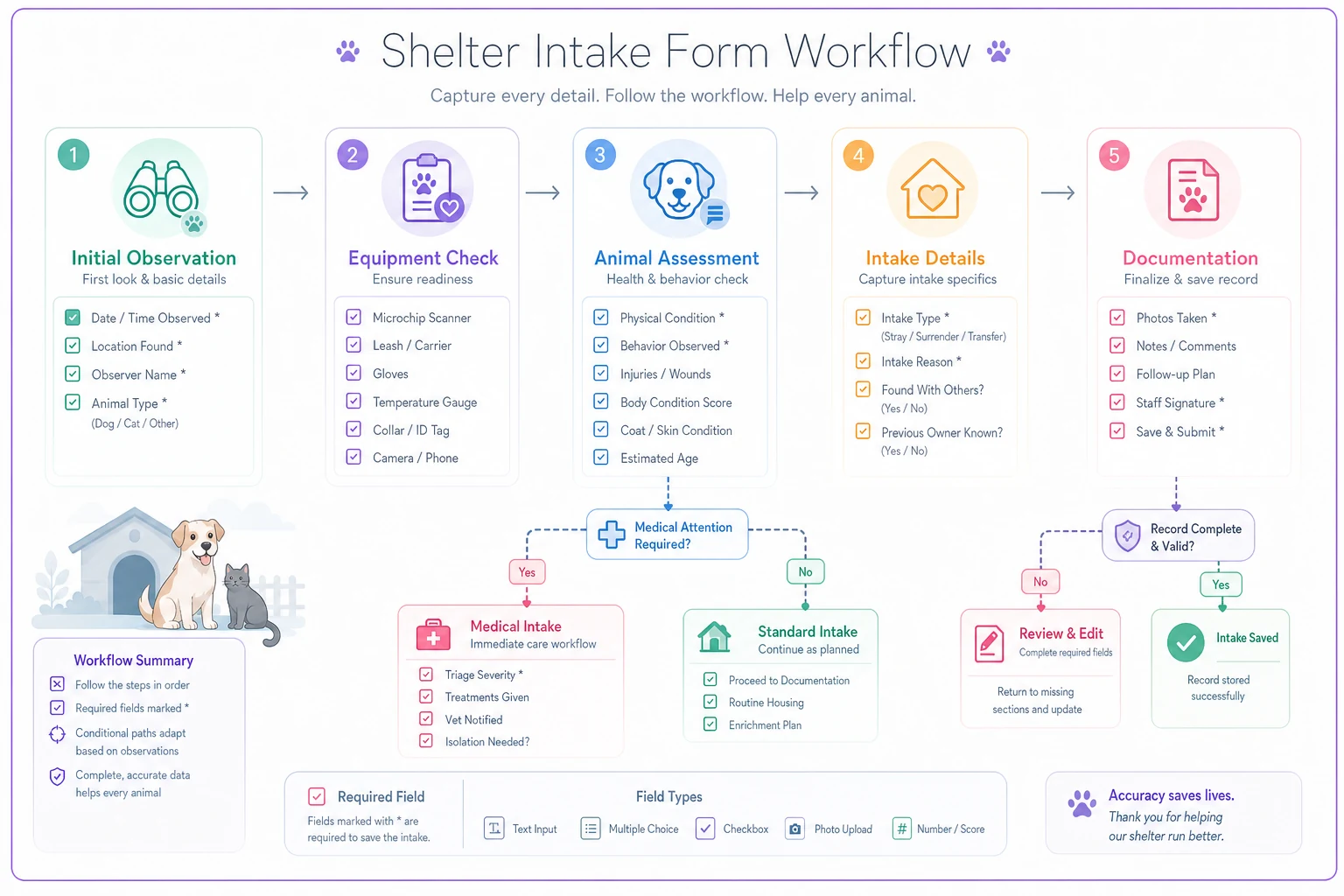
The workflow shows how to move from what you see immediately to what needs equipment checks to what needs documentation, with branching where conditional logic applies.
Common data quality failures and their fixes
Three months into using a new intake system, you run reports for a grant application. The data is a disaster. 40% of dogs listed as "mixed breed" with no other details. Intake dates that don't match kennel cards. Owner zip codes from cities that don't exist.
These aren't random errors. They follow patterns.
The "speed entry" problem: During rushes, staff default to the fastest option. Every cat becomes DSH. Every dog becomes medium-sized. Every age becomes "adult."
Fix: Create quick-select buttons for your five most common intake profiles. "Young adult pit mix." "Senior small dog." "Stray kitten." Staff can select a profile then modify as needed instead of starting from scratch.
The "unclear field" problem: One shelter discovered staff were entering microchip brand names in the chip number field because the label just said "microchip info."
Fix: Use explicit field labels. Not "microchip info" but "15-digit chip number." Not "source" but "where found/surrendered."
The "different interpretations" problem: What counts as "aggressive"? Growling? Snapping? Actual biting? Without clear definitions, five staff members will record five different ways.
A Midwest shelter network tracked their most common data errors for a month:
| Error Type | Instances | Impact |
|---|---|---|
| Wrong intake dates | 127 | Affects legal holds |
| Missing microchip scans on dogs | 89 | Lost reunion opportunities |
| Incomplete owner contact info | 156 | Can't reach for updates |
| Breed listed only as "mix" | 203 | Poor adoption matching |
They fixed these through system constraints, not training. Date fields now default to today but require confirmation. The system won't save a dog intake without a microchip field marked "scanned - no chip" or a chip number. Owner records require at least two contact methods. Breed fields require primary breed selection before allowing "mix."
Sample forms you can adapt
What actually works in practice? Not theoretical perfect forms, but the ones shelters use during parvo outbreaks and hoarding cases and Saturday surrender rushes.
Quick stray intake (paper):
STRAY INTAKE - IMMEDIATE PROCESSING Intake #: Date: Time: ANIMAL: □ Dog □ Cat □ Other: Color/Markings: Sex: □ M □ F □ MN □ FS □ Unknown Size: □ Small (<25lb) □ Med (25-60lb) □ Large (>60lb) FOUND: Location: Finder Name: Phone: □ Finder wants updates □ Finder interested in adopting MEDICAL FLAGS: □ Injured - describe: □ Pregnant/nursing □ Under 8 weeks □ Needs immediate vet SCAN: Microchip: □ No chip □ Chip #: Collar/Tags: HOLD EXPIRES:
The digital version expands significantly but maintains logical flow. Basic info gets auto-populated where possible. Medical history sections include vaccination records, medications, and conditions. Behavioral assessments cover living situations, house training, and bite history. Surrender circumstances explore moving, allergies, behavior, or financial reasons.
The key difference: digital forms can enforce completion of critical fields and hide irrelevant sections. If someone marks "found stray," the surrender reason section disappears.
Integrating with your existing shelter systems
Your intake data is only useful if it flows into your other systems. The best shelter intake form template in the world becomes worthless if someone has to re-enter everything into your shelter management software.
Most shelters cobble together multiple systems — shelter management software for animal records, separate financial system for fees, maybe a different platform for online applications. Getting these to talk requires strategy.
If you're using paper forms, designate data entry windows. One shelter reduced errors 70% by batching entry instead of doing it piecemeal. Every afternoon at 2 PM, someone enters all morning intakes. Every evening at 7 PM, afternoon intakes get entered. This creates a rhythm and ensures nothing sits too long.
For digital systems, the integration points that matter most are intake to medical records for treatment protocols, intake to kennel cards for daily care, intake to website for lost pet matching, and intake to outcome tracking for length-of-stay calculations.
A California shelter discovered their intake forms weren't syncing with their adoption system, causing adopters to see incorrect information online. Dogs listed as good with cats weren't. Ages were off by years. They fixed it by creating a single "source of truth" — intake data feeds everything else, and only intake staff can modify core animal records.
The manual workaround that actually works: If your systems don't integrate, create a daily reconciliation process. Print a summary report from intake. Check it against your shelter software. Flag discrepancies immediately, not weeks later when you're pulling reports.
Scaling beyond the basics
You've got your minimum dataset solid. Intake runs smoother. Data quality improved. Now what?
The shelters that excel at data collection add layers gradually. They identify specific operational problems and add targeted fields to address them.
A Texas shelter noticed they were getting lots of returns for "unexpected" behavior issues. They added a behavioral intake section — not a full assessment, just quick observations. "Dog pulled hard on leash." "Cat hid entire time." "Showed food guarding during intake treat test." These notes helped adoption counselors set better expectations. Returns dropped roughly 20%.
Another common addition: photograph protocols. One intake photo isn't enough anymore. Shelters building strong lost-pet reunion programs need multiple angles, distinguishing markings, collar photos. But adding "take 6 photos" to your intake process might break it during busy times.
The solution works through tiered photography. Intake gets one clear face photo — enough for basic identification. Within 24 hours, a different team captures comprehensive photos for online profiles and lost pet matching.
Quality shelter data isn't about capturing everything. It's about capturing what you'll actually use. Before adding any field, ask: Who will use this data? When? For what decision? If you can't answer clearly, that field doesn't belong in intake.
Modern tools that reduce friction
The gap between paper forms and enterprise shelter software keeps widening. But there's a middle ground that more shelters are finding: operational software that handles the intake workflow without requiring massive system overhauls.
Picture this setup: Volunteers use a simple tablet form for basic intake. It auto-generates an intake number, timestamps everything, requires photos before saving. The data flows into a central system where staff can expand records, add medical notes, track outcomes. No paper to lose. No complex training needed. No fight with outdated shelter management systems.
These AI-powered operational platforms excel at catching mundane mistakes that create errors. They can check that microchip numbers have the right number of digits. Flag when someone enters an impossible date. Suggest breed classifications based on photos. Generate kennel cards automatically.
The real value isn't the AI doing intake — it's AI catching the mistakes humans make when rushed. One shelter implemented basic automation for their intake workflow: checking for duplicate microchips, flagging unusual species/breed combinations, ensuring phone numbers had correct digits. Their data corrections dropped from around 50 per week to under 10.
Don't overcomplicate it though. The best intake process is the one that actually gets used. Whether that's paper forms with carbon copies, a simple digital form, or comprehensive shelter software, consistency beats complexity every time.
Making intake data work for your team
Six months from now, you could have thousands of perfectly captured intake records. Or you could have data that actually drives better decisions.
The difference comes down to using what you collect. Run weekly reports on surrender reasons to spot trends. Track intake source locations to identify stray hotspots. Monitor hold compliance to avoid legal issues. Compare intake condition scores to outcome data to improve your care protocols.
The shelters that excel at data-driven operations don't just collect information — they create feedback loops. Intake data identifies problems. Operational changes address them. Outcome data validates the fixes.
Start simple. Pick one operational question your intake data should answer. Maybe it's "Where are most strays coming from?" or "What percentage need immediate medical care?" or "How many owner surrenders could we prevent with resources?"
Build your intake process to answer that question well. Then add another question. Then another. Let your operational needs drive your data collection, not the other way around.
Good intake forms aren't about perfection. They're about capturing enough information, consistently enough, to keep animals safe and operations running. The perfect shelter intake form template is the one your team will actually complete when three dogs just arrived and the phone won't stop ringing.
Ready to enhance your shelter’s impact?
Join 500+ shelters using Animlly to improve care coordination, increase adoptions, and engage communities effectively.