


Most shelters don't get breached because a brilliant hacker spent weeks studying them. They get breached because someone reused a password across three logins, the cloud admin account never had multi-factor turned on, and the "temporary" volunteer account from last summer still works. The attacks that actually hit shelters are boring, opportunistic, and almost always preventable with a handful of controls nobody got around to configuring.
This checklist is built around that reality. It covers both on-premise setups (the server humming in the back office) and cloud-hosted shelter management software, because plenty of shelters run a hybrid of both without fully realizing it. It's written so you can work through it during normal operations — or pull it out fast when risk spikes, like it did during the August 2026 wave. If you haven't read it yet, the companion piece on practical cybersecurity actions during the Aug 2026 AI-driven attack surge pairs well here — that post is about rapid response, this one is about the standing posture you want in place beforehand.
Start with the thing that actually gets exploited: access
Before encryption, before patching, before anything that sounds impressive — deal with who can log into what. In real shelter operations, the access list is almost never accurate. You'll find accounts for people who left eight months ago, a shared "frontdesk" login that four volunteers use, and one admin account whose password is on a sticky note under the keyboard.
The pattern that burns shelters: staff turnover and volunteer churn are high, but offboarding is informal. Someone quits, nobody disables their account, and that login becomes a quiet open door. The person who left has no bad intent — but their reused password shows up in a credential dump from some unrelated website breach, and now an attacker has a valid account in your animal shelter management software.
Access control checklist:
-
Every person has their own named account. No shared "frontdesk" or "kennel" logins, ever.
-
Admin rights are limited to two or three people maximum, and those people have separate regular accounts for daily work.
-
Volunteers get role-based access scoped to what they actually touch — intake, foster coordination, whatever — and nothing more.
-
Offboarding has a hard rule
account disabled the same day someone leaves or stops volunteering. Put it on the exit checklist next to "collect keys."
-
Run an access review quarterly. Print the full user list, sit down for 20 minutes, and ask "do we know who this is and do they still need this?" You will delete accounts every single time.
The quarterly review is the one people skip because it feels tedious. It's also the one that catches dormant accounts before an attacker does.
Multi-factor authentication: the single highest-value hour you'll spend
If you only do one thing from this entire article, turn on MFA for every admin and every account that can touch animal records, medical data, donor information, or financials. MFA stops the overwhelming majority of credential-based attacks cold — a stolen password alone is no longer enough.
Streamline your shelter operations effortlessly.
Animlly helps you manage every pet, volunteer, and adoption step with ease and accuracy.
- Comprehensive pet profiles
- Volunteer scheduling & communication
- Adoption tracking & reporting
No credit card required
The pushback is always the same: "our volunteers aren't technical, they'll get confused." Fair. But you don't need to force a hardware key on the Saturday dog-walker. Tier it.
| Role | Access level | MFA requirement |
|---|---|---|
| Admin / IT | Full system control | Mandatory — app-based or hardware key, no SMS |
| Shelter manager | Records, medical, reporting | Mandatory — app-based (Authenticator/Authy) |
| Clinic / medical staff | Medical records, controlled logs | Mandatory — app-based |
| Front desk / intake | Daily intake, basic records | Required — app-based preferred |
| General volunteer | Limited task access | Required if remote; strongly encouraged on-site |
Two notes from real setups. First, avoid SMS-based codes for admin accounts — SIM-swapping is a known workaround and your admin accounts are the crown jewels. Use an authenticator app or a physical security key. Second, when a shelter says "we enabled MFA," I always ask which accounts. About half the time the answer is "the main admin one," and the cloud billing account, the email account, and the backup system are all still wide open. MFA isn't a checkbox you tick once; it's a coverage map.
Encryption, and the version of it people forget
Everyone nods along about encryption and then only thinks about data traveling over the internet. That part's usually handled — your cloud shelter management software almost certainly uses HTTPS, and if it doesn't, stop reading and go find a different vendor.
The gap is data at rest, especially on-premise. The server in the back office, the laptop the manager takes home, the external drive backups live on — if any of those get stolen during a break-in, unencrypted data walks out the door with them. A shelter holds more sensitive information than people assume: adopter home addresses, donor payment details, staff records, sometimes cruelty-case documentation tied to active investigations.
Encryption checklist:
-
Confirm data in transit uses TLS (HTTPS) everywhere, including any admin portals.
-
Enable full-disk encryption on every device that touches shelter data — BitLocker on Windows, FileVault on Mac. It's free and takes minutes.
-
Encrypt backup drives. A backup is just a second copy of all your sensitive data; treat it accordingly.
-
For cloud software, confirm with the vendor that data is encrypted at rest on their servers (this is in the vendor questionnaire below).
-
Phones and tablets used for field intake or foster coordination get device encryption and a screen lock. These get lost constantly.
The laptop-left-in-a-car scenario is the one that actually happens. Full-disk encryption turns that from a reportable data breach into a shrug and an insurance claim for a laptop.
Patching: the boring habit that closes the door AI-driven scanners are banging on
Here's what changed recently and why patching matters more than it used to. Automated attack tools now scan enormous ranges of the internet continuously, looking for software with known, unpatched vulnerabilities. They don't care that you're a 12-kennel shelter. If your on-premise server is running an outdated version of anything exposed to the internet, you're a target of opportunity, found by a machine within hours of coming online.
A realistic patching rhythm for a small team:
-
Enable auto-updates on everything that offers it — operating systems, browsers, and ideally your shelter management software if it's cloud-hosted (the vendor handles this for you, which is a genuine advantage of cloud).
-
Assign one owner. Patching with no owner is patching that never happens. One named person checks monthly.
-
Schedule a monthly 30-minute window — first Monday, whatever — to apply updates that don't auto-install, especially on on-premise servers and networking gear.
-
Don't forget the router and firewall. Shelter network hardware often runs firmware from the day it was installed. Check it.
-
Retire unsupported software. If a vendor stopped issuing security updates for a product, it's a liability no matter how well it works. Plan the migration.
Cloud-hosted software shifts most of this burden onto the vendor, which is one of the quiet reasons smaller shelters with no dedicated IT person are often more secure on a well-run cloud platform than on a self-managed server they can't keep current.
Backups: assume you'll need them, test like you mean it
Ransomware is the scenario that ends shelters' weeks. Files get encrypted, operations freeze, and a ransom demand appears. The only reliable answer is backups you can actually restore from — not backups you think you have.
The mistake isn't failing to back up. It's never testing the restore. A shelter runs nightly backups for two years, feels covered, then hits an emergency and discovers the backups were silently failing since a config change last spring. The backup job showed green. The data was garbage.
Follow the 3-2-1 rule: three copies of your data, on two different types of media, with one copy off-site (and ideally offline or immutable, so ransomware can't reach it).
-
On-premise nightly local backup plus an off-site copy — cloud backup service or a drive rotated off the premises weekly.
-
Cloud software confirm the vendor's backup frequency and retention, and keep your own independent export on a schedule. Don't trust a single party with your only copy.
-
Test restores quarterly. Actually pull a backup and restore a sample of records. If you've never done this, do it this week — it's the single most revealing security test you can run.
-
Keep at least one backup copy that ransomware can't encrypt
offline, air-gapped, or an immutable cloud backup.
Label backup drives with dates and record rotation in a shared calendar so you know which copy is off-site.
Keep at least one backup copy that ransomware can't encrypt: offline, air-gapped, or an immutable cloud backup.
Logging: you can't investigate what you didn't record
When something goes wrong, the first question is "what happened and when?" If your software isn't logging access and changes, you're guessing. Logging won't prevent an incident, but it's the difference between "we contained it in an hour" and "we have no idea what they touched, so we have to assume everything."
What you want logged, at minimum: login attempts (successful and failed), record access and edits to sensitive data, permission changes, and data exports. That last one matters — a sudden bulk export of your adopter or donor database at 3 a.m. is exactly the kind of signal you want flagged.
-
Confirm your shelter management software keeps audit logs and that you can view them without calling the vendor.
-
Set up an alert (or a weekly glance) for repeated failed logins — that's often the first visible sign of someone brute-forcing an account.
-
Watch for logins at strange hours or from unexpected locations.
-
Keep logs long enough to be useful. Thirty to ninety days is a reasonable floor for a small shelter; some compliance situations need more.
The weekly glance is realistic for a small team. Nobody's watching a security dashboard at a shelter. But five minutes every Friday scanning failed logins and export activity catches a surprising amount.
API protections: the integration door nobody's watching
Shelters increasingly connect their management software to other systems — microchip registries, adoption listing sites, payment processors, municipal reporting feeds. Every one of those connections runs on an API with a key or token, and those keys are a commonly overlooked exposure.
The typical problem: an API key gets generated, pasted into a config somewhere, and forgotten. It never expires, it has full access rather than limited scope, and sometimes it ends up in a document or shared message where it shouldn't be. If that key leaks, an attacker can pull data straight through the integration without ever touching a login screen.
API checklist:
-
Inventory your integrations. List every external system connected to your shelter software. Most teams can't name them all off the top of their head — that's the problem.
-
Scope keys narrowly. A listing-site integration needs read access to adoptable animals, not write access to your whole database.
-
Rotate keys periodically and immediately revoke any that are no longer used.
-
Never store keys in plain text in shared docs, emails, or chat.
-
Confirm the vendor supports scoped, revocable API access rather than one all-powerful master key.
If your data flows through APIs for municipal reporting or partner integrations, tightening these connections is part of the same work as keeping that data clean and governed in the first place.
The vendor security questionnaire
If you're on cloud-hosted software — or evaluating any — their security is your security. You're trusting them with everything. Most shelters never ask a single hard question before signing up. Send these and read the answers critically. Vague or evasive responses are themselves an answer.
-
Data encryption Is our data encrypted in transit and at rest? What standard?
-
MFA Do you support multi-factor authentication for all account types, including app-based and hardware keys?
-
Backups How often do you back up our data, how long do you retain it, and can we request a full export of our own data at any time?
-
Access controls Can we set role-based permissions? Who on your staff can access our data, and under what circumstances?
-
Breach history and notification Have you had a security incident in the past three years? What's your breach notification process and timeline to us?
-
Compliance & audits Do you undergo independent security audits (SOC 2 or equivalent)? Can you share the report or summary?
-
Uptime & recovery What's your uptime record, and what's your disaster recovery plan if your infrastructure goes down?
-
API security How are API keys managed, scoped, and rotated? Can we revoke access to specific integrations?
-
Data ownership & offboarding If we leave, how do we get our complete data, and how/when is it deleted from your systems?
-
Logging Can we access audit logs of who accessed and changed our data?
A good vendor answers these quickly and specifically because they've been asked before. A vendor that gets defensive, stalls, or sends marketing copy instead of answers is telling you exactly how they'll behave when something actually goes wrong.
A real scenario: the dormant account that nearly ended a Tuesday
A mid-sized municipal shelter — roughly 40 staff and volunteers rotating through, around 2,500 animals handled a year — ran cloud-based management software and felt reasonably covered. They had MFA on the main admin account and HTTPS, so they figured they were fine.
During a routine access review (prompted, honestly, by the August scare), they printed the full user list for the first time in over a year. It had 61 active accounts. They had maybe 40 active people. Some of the extras were obvious — former volunteers, two staff who'd left. But one account stood out: a former contractor's login, still active, still holding elevated permissions, last used months after the contractor's engagement ended. Nobody had logged that use.
Nothing catastrophic had happened — no confirmed misuse. But that was a full-access account, no MFA, sitting open for the better part of a year, invisible because nobody looked. They disabled 21 accounts that afternoon, enforced MFA across every account with record access, and put a recurring quarterly access review on the calendar. The whole cleanup took about two hours. The exposure it closed had been sitting there, free for the taking, the entire time.
That's the shape of most shelter security risk. Not dramatic. Just quiet gaps that stay open because the review never happens.
When to do the full pass vs. the fast pass
Do the full pass — every section above — at least twice a year, and whenever you onboard new software, change vendors, or have significant staff turnover. Block an afternoon. It's genuinely a few hours of work, not a project.
Do the fast pass when risk spikes — a reported attack wave, news of a breach at a vendor you use, a suspicious login alert. The fast pass is: confirm MFA is on everywhere that matters, run the access review and kill dormant accounts, verify your last backup actually restores, and scan recent logs for failed logins and odd exports. Thirty to sixty minutes, and it closes the doors attackers walk through most often.
Who should not treat this as optional: any shelter holding donor payment data, active cruelty-case documentation, or operating under a municipal contract with reporting obligations. For those shelters, these aren't best practices — they're the baseline you'd be expected to meet if anyone ever asked.
Here's a quick workflow for choosing a fast pass vs a full pass.
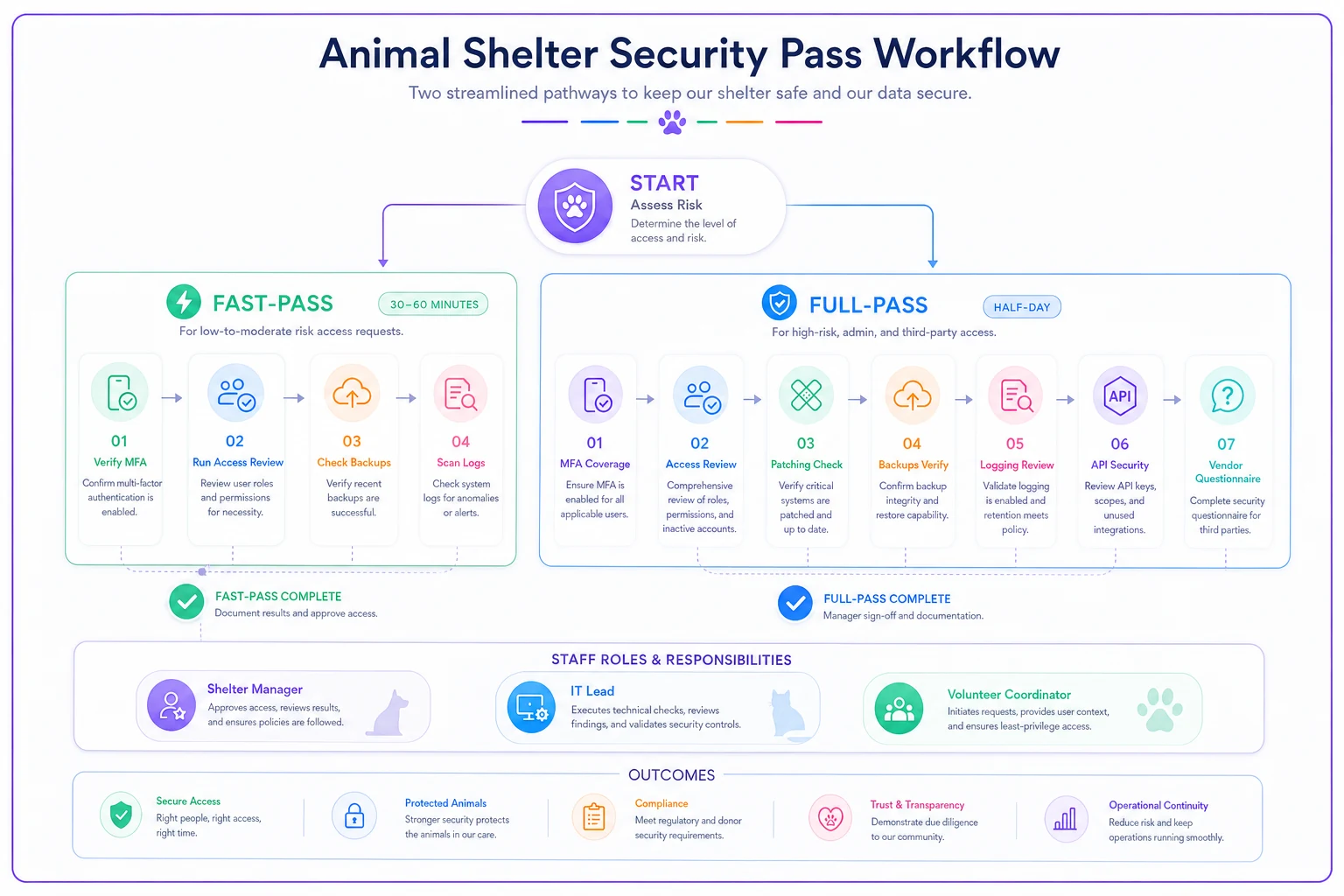
Use this workflow as a quick reference during a spike; it's intended to be concise and actionable.
Bringing it together
Shelter security isn't about buying the most expensive tool or hiring a specialist you can't afford. It's about closing the specific, predictable gaps that opportunistic attacks exploit — stale accounts, missing MFA, untested backups, forgotten API keys, vendors nobody vetted. Every item in this checklist is something a small team can actually do without a dedicated IT department.
The shelters that handle elevated-risk periods without much drama aren't the ones with cutting-edge defenses. They're the ones who already did the quarterly access review, already turned on MFA everywhere, already tested a restore last month. When the next surge hits, they tighten a few things and move on because the foundation was already there. Start with access and MFA this week — those two alone shut most of the door — and work through the rest at a pace your team can sustain. For the rapid-response side when an active threat is already in the news, keep the Aug 2026 cyberattack response actions handy alongside this checklist.
Start with access and MFA this week — those two alone shut most of the door — and work through the rest at a pace your team can sustain. For the rapid-response side when an active threat is already in the news, keep the Aug 2026 cyberattack response actions handy alongside this checklist.
Ready to enhance your shelter’s impact?
Join 500+ shelters using Animlly to improve care coordination, increase adoptions, and engage communities effectively.