

Most shelter software failures don't look dramatic. They look like a volunteer at 7am staring at a spinning wheel because the WiFi in the intake trailer is down and the kennel cards are stuck "syncing." They look like someone discovering that the medical history for 40 animals lives only on one laptop that just died. They look like a spreadsheet that someone "cleaned up" over the weekend, wiping out three months of outcome data that nobody backed up.
The pattern underneath all of these is the same: shelter IT usually grows by accident. Nobody sits down and designs it. You start with a spreadsheet, add a cloud tool, bolt on a scanner, and five years later you have a system that works fine right up until the moment you actually need it. This post is a prescriptive, non-technical reference architecture — meant to give small teams actual runnable artifacts rather than the usual vague advice. The goal is a setup that keeps working offline, survives disasters, and never traps your data inside one vendor.
The pieces are covered in the order they tend to break: identity (how you name animals), sync (how data moves), backup (how you recover), migration (how you switch systems), and lock-in (how you stay free to leave). You can implement these incrementally. None of it requires a developer on staff.
Start with the one thing everything else depends on: the master animal ID
Before worrying about sync or backups, there's a boring question that quietly causes roughly half of all shelter data problems: how is each animal uniquely identified?
In practice, this breaks because a single animal ends up with three or four "identities." There's the microchip number, the intake number your software auto-generates, the name staff gave it, and sometimes a shorthand scrawled on the kennel card. When two systems don't agree on which one is the "real" ID, reconciliation turns into a mess — duplicate records, orphaned medical notes, outcome stats that don't add up.
The fix is to define a master animal ID that is yours, stable, and completely independent of any vendor. This is the single spine that every other record hangs off.
A simple, durable spec you can adopt as-is:
-
SHL— a short 2–4 letter prefix for your shelter (keeps IDs unique even if you later merge data with a partner shelter) -
YYYY— the intake year -
NNNNNN— a zero-padded sequential number that never resets and never gets reused
Example: RVR-2026-004812
Rules that make this actually work:
-
The master ID is assigned once, at intake, and never changes — not on transfer, not on adoption return, not ever.
-
Microchip number, vendor record ID, and any legacy spreadsheet row ID are stored as linked attributes, not as the primary key.
-
If an animal returns, it keeps its original master ID and you log the new episode against it. Returns are events, not new animals.
-
The ID is printed (as text and barcode/QR) on the kennel card, so any volunteer can scan or type it even when systems are offline.
That last point matters more than it sounds. The master ID has to be something a human can read off a card and re-enter by hand during an outage. If your identity scheme only exists inside the database, it disappears the moment the database does.
This identity discipline connects directly to the broader data governance standard — taxonomy, ownership, and export-ready mappings that keeps field names consistent across systems. The ID is the anchor; the governance standard is the dictionary.
Offline-first sync: three patterns, picked by how messy your reality is
There's an uncomfortable truth about shelter connectivity: your intake area, your transport van, your off-site adoption table, and your isolation ward are exactly the places where WiFi is worst and reliable data capture matters most. Any architecture that assumes a solid connection will fail precisely where you need it.
Streamline your shelter operations effortlessly.
Animlly helps you manage every pet, volunteer, and adoption step with ease and accuracy.
- Comprehensive pet profiles
- Volunteer scheduling & communication
- Adoption tracking & reporting
No credit card required
"Offline-first" means the device works fully without a connection and syncs later. The question isn't whether to be offline-first — it's which sync pattern fits your situation. There are three practical options, and most small shelters only need one.
Pattern A: Single writer, pull-only mirror
-
Good for very small shelters, single building, one or two people doing data entry.
-
Why it works no conflicts are possible, because only one place writes.
-
The catch people in the field can't record new data offline — they have to hold it (paper, photos) and enter it later.
Pattern B: Queue-and-forward writes
-
Each device captures data locally and stores every change in a local queue. When connectivity returns, queued changes are sent in order and merged. New records (a new intake) almost never conflict; edits to the same existing record occasionally do.
-
Good for shelters with a van, an off-site event, or a trailer where new animals get created in the field.
-
Why it works field teams keep working at full speed; nothing waits on a signal.
-
The catch you need a clear rule for the rare edit conflict — more on that below.
Pattern C: Two-way sync with conflict resolution
-
Multiple locations write to the same records and reconcile automatically. This is the most capable and the most dangerous. It's where "last write wins" silently overwrites someone's medical note.
-
Good for multi-site operations, networks sharing animals across facilities.
-
Why it works everyone edits freely, everywhere.
-
The catch conflict resolution has to be designed, not defaulted. Blind "last write wins" is how you lose data.
| Sync pattern | Setup effort | Conflict risk | Best fit | What breaks at scale |
|---|---|---|---|---|
| A — Single writer / pull mirror | Low | None | 1 building, 1–2 entry staff | Field teams bottlenecked; can't capture offline |
| B — Queue-and-forward | Medium | Low | Van + off-site events | Edit conflicts on shared records if unhandled |
| C — Two-way sync | High | High | Multi-site networks | Silent overwrites without good merge rules |
The mistake small teams make is reaching for Pattern C because it sounds the most modern. In practice, most single-site shelters are best served by Pattern B, and some are perfectly fine with Pattern A. Complexity you don't need is just more surface area to fail.
A simple conflict rule you can actually enforce
-
Medical and outcome fields never auto-overwrite. On conflict, keep both versions and flag for human review.
-
Status/location fields (which kennel, available/hold)
last update wins, because the physical world moves on.
-
Free-text notes append, never replace. Two notes beat one lost note.
Write these rules down and put them in your technology governance documentation so the decision survives staff turnover. The worst conflict policy is the one that lives only in one person's head.
Backup and restore: a cookbook, not a vibe
Almost every shelter thinks it has backups. Very few have ever tested a restore. Those are completely different things. A backup you've never restored is a hope, not a safeguard.
A pragmatic rule small enough to actually follow: 3-2-1, shelter edition.
-
3 copies of your data
-
2 different storage types (e.g., cloud + an external drive)
-
1 copy physically off-site or in a separate cloud account
The part people skip is the restore drill. Backups rot quietly. Schemas change, vendors update, someone renames a folder. The only way to know your backup works is to restore it on purpose, on a schedule.
Monthly 20-minute restore drill:
-
Pick a backup file at random from the last 30 days.
-
Restore it into a separate, non-production location (a spare laptop, a sandbox folder, a test account).
-
Open five animal records and confirm the master ID, medical history, and current status are intact.
-
Spot-check that linked attributes (microchip, photos) came along.
-
Log the result — date, who ran it, pass/fail, time taken.
If a restore takes longer than your drill time allows, that is your finding. The day of a real outage is not when you want to discover recovery takes six hours.
What to back up, in priority order:
-
Master animal IDs and the records attached to them (non-negotiable, daily)
-
Medical and vaccination history (daily)
-
Outcomes and intake logs (daily)
-
Photos and documents (weekly is usually fine)
-
Configuration/settings for your software (after any change)
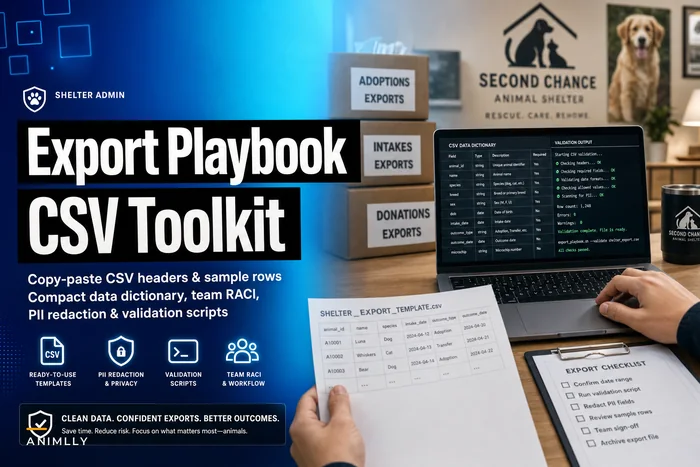
One more thing that bites people: export your backup in an open format you can read without the vendor's software. A proprietary backup file you can only open inside the tool that made it is only half a backup. CSV exports of your core tables, run on a schedule, are the cheapest insurance in this entire article. The Shelter Export Playbook with copy-paste CSV headers and validation scripts is a direct companion here — those same exports double as both your interoperability layer and your human-readable backup.
Migrating off a spreadsheet (or off an old system) without losing your history
The spreadsheet-to-system cutover is where a lot of good data goes to die. The failure mode is almost always the same: the migration happens in a rush, there's no validation, and three weeks later someone notices the dates are off or 60 records didn't come across. By then the old spreadsheet has drifted and you can't tell what's missing.
Treat a migration as a project with a reversible path, not a one-click import.
Pre-migration
-
[ ] Freeze the source
declare a cutoff date/time after which no one edits the old spreadsheet.
-
[ ] Take a full, dated copy of the source and lock it read-only. This is your reference forever.
-
[ ] Map every source column to a destination field. Decide what happens to columns with no home (don't silently drop them — park them in a notes field).
-
[ ] Assign or confirm a master animal ID for every single row.
-
[ ] Define "done" — e.g., row counts match, no blank IDs, dates parse correctly.
Migration
-
[ ] Import into a staging copy first, never straight into live.
-
[ ] Run validation
row count old vs new, count of blank required fields, duplicate ID check, earliest/latest date sanity check.
-
[ ] Spot-check 25–30 records by hand across intake, medical, and outcomes.
Post-migration
-
[ ] Run parallel for one to two weeks
keep updating the old source and the new system, then compare.
-
[ ] Only decommission the old source after a clean comparison and a successful backup of the new system.
-
[ ] Keep the frozen source copy indefinitely.
If your spreadsheet has 1,240 rows and your import shows 1,198 animals, you don't shrug and move on — you find the missing 42. Usually it's blank IDs, merged cells, or a date format the importer choked on. The row-count check is boring and it catches more disasters than anything fancy.
This is also the natural moment to fix field names and formats rather than importing old mess into a new box. Lining the migration up with your data interoperability roadmap for APIs, schemas, and municipal reporting means you clean the data once and it stays clean for reporting downstream.
Vendor lock-in: the slow-motion failure most teams don't see coming
Lock-in rarely announces itself. It shows up years later when you want to switch tools or push back on a price increase and realize you literally can't leave because your data can't come with you. The whole architecture above — master IDs, open-format backups, CSV exports — is partly designed to keep that door open.
A few plain rules that keep you free:
-
You must be able to export everything, yourself, without asking the vendor. If export requires a support ticket or a fee, that's a red flag.
-
Exports must include relationships, not just flat tables. A list of animals and a separate list of medical events are useless if nothing links them. Your master ID has to appear in every export so records can be reassembled.
-
Own your identifiers. This is why the master ID is yours and not the vendor's auto-number. If you ever migrate, you re-link everything by your ID.
-
Prefer tools that speak standard formats (CSV, JSON, standard reporting schemas) over tools that only talk to themselves.
-
Keep a current data dictionary so a future system knows what each field means.
When heavy integration is worth it — and when it isn't
When tighter integration makes sense: you're running a multi-site network, you report to a municipality, or you share animals across partners. The coordination savings outweigh the lock-in risk — as long as you keep exporting in parallel.
When it's a bad idea: you're a single small shelter being sold a deeply custom, closed system "tailored just for you." Custom-and-closed is the most expensive kind of trap, because nobody else can ever import your data.
Who should skip Pattern C and deep integrations entirely: a volunteer-run shelter with one building and two data-entry people. You'll burn your scarce energy maintaining machinery you don't need. Pattern B plus disciplined exports will serve you better and cost you far less in sanity.
How the pieces fit together
Picture the data flow as four layers, bottom to top:
-
Capture layer — kennel cards (with printed master ID + QR), intake forms, a scanner, mobile devices in the field. Everything here must work with zero connectivity.
-
Local store layer — each device holds its own copy and, in Pattern B, a queue of unsent changes. This is the shock absorber for bad WiFi.
-
Sync layer — the agreed pattern (A, B, or C) moves changes to the central record, applying your written conflict rules. Field-level rules decide what overwrites, what appends, what gets flagged.
-
System of record + backup layer — the central database holds the master-ID-anchored truth. On a schedule, it pushes open-format CSV/JSON exports to the 3-2-1 backup targets. Those exports are simultaneously your backup, your reporting feed, and your escape hatch from any vendor.
The throughline across all four layers is the master animal ID. It's printed at capture, queued through sync, stored as the primary key in the system of record, and present in every backup export. One stable spine, carried end to end. When something breaks — a device dies, a sync fails, a vendor folds — the master ID is what lets you stitch reality back together. Without it, every layer operates on its own interpretation of which animal is which, and that's where the real data loss happens.
Here's a simple workflow illustrating those layers and the flow of the master animal ID across them.
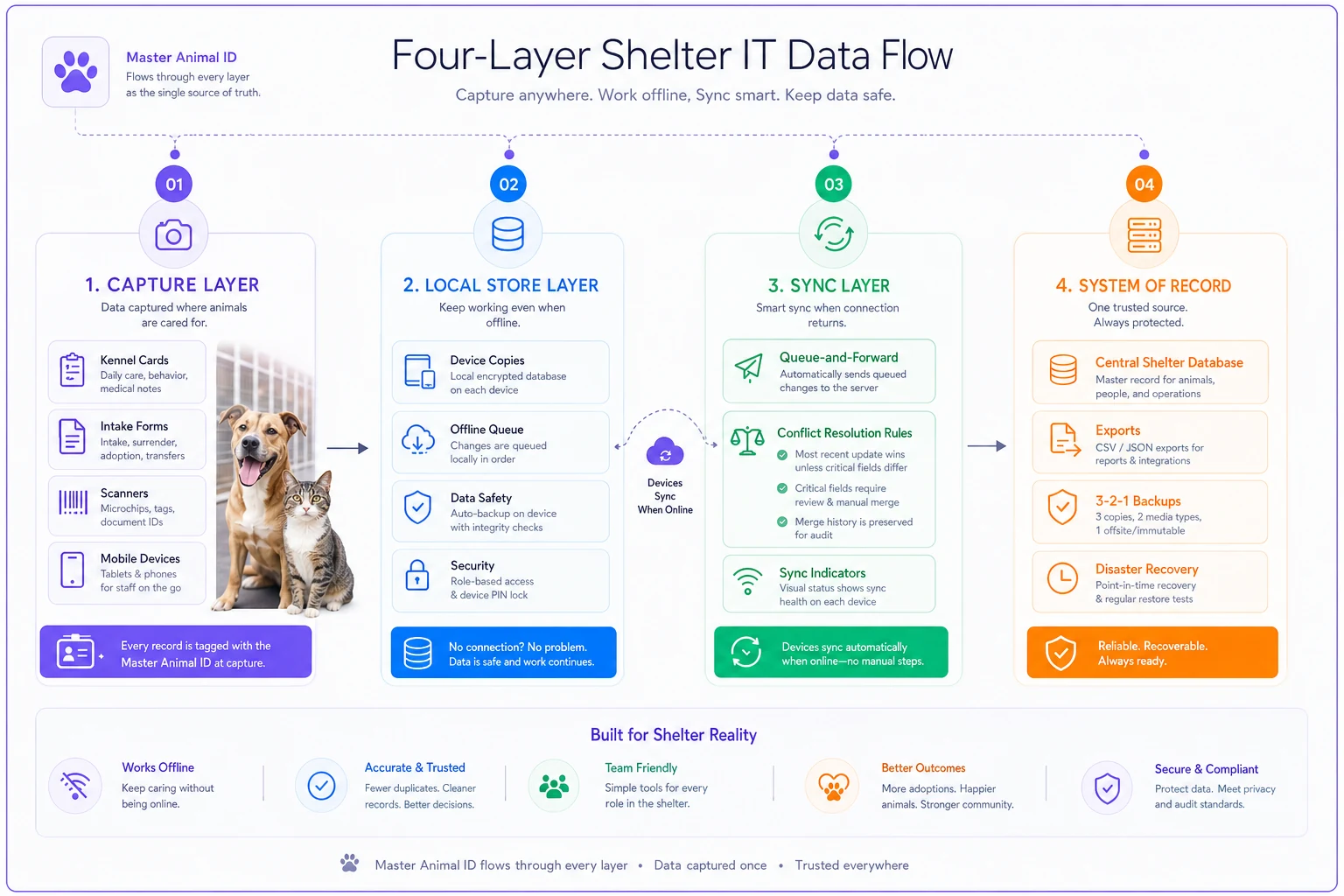
The master animal ID is the spine that ties these layers together and the exports are your escape hatch when a vendor or device fails.
A real scenario: the trailer, the storm, and the restore that worked
A mid-size municipal-contract shelter — roughly 70 kennels, around 2,400 intakes a year, run by a small paid staff plus volunteers — had their main intake happening in a metal trailer with notoriously bad WiFi. For two years they'd been capturing intake on paper and re-typing it into their system later, usually a day behind. During a bad storm they lost power for most of a day, took in around 30 displaced animals, and the backlog of un-entered paper piled up fast. Two kennel cards went missing in the chaos, and nobody could say for certain which animals they belonged to.
After that, they applied three things from this blueprint. They moved to a queue-and-forward setup (Pattern B) so the trailer could create records offline and sync when connectivity returned. They standardized on a printed master ID + QR on every card, so a lost card could be matched back by scanning the animal's chip and cross-referencing. And they started a monthly restore drill.
The first restore drill failed — their "backup" was a manual export someone had stopped running three weeks earlier. That failure was the whole point. They caught it in a test instead of a crisis. Within a couple of months, same-day data entry went from "basically never" to the normal case, the day-behind backlog mostly disappeared, and when a laptop died a few months later they restored onto a spare in under half an hour with nothing lost. Not a dramatic transformation — just a noticeably calmer operation that stopped losing animals in its own paperwork.
Where this connects to the rest of your operation
Resilient shelter IT architecture isn't a standalone IT project. It's the foundation your medical records, outcome reporting, municipal contracts, and disaster response all sit on. When the identity spine is solid, your data governance standard has something to attach to, exports feed reporting cleanly, and continuity planning has real teeth. It's worth reading this alongside the broader shelter resilience framework for finance, surge, and cyber continuity, because a data outage during a surge is exactly the compound failure these systems are built to absorb.
Start small. Pick your master ID format this week and print it on your kennel cards. Choose the sync pattern that matches your real connectivity, not the fanciest one available. Run one restore drill and let it fail if it's going to — better now than during the next storm. The shelters that stay standing through outages, migrations, and vendor changes aren't the ones with the biggest systems. They're the ones whose data can walk out the door intact, no matter what happens to the software around it.
Start small. Pick your master ID format this week and print it on your kennel cards. Choose the sync pattern that matches your real connectivity, not the fanciest one available. Run one restore drill and let it fail if it's going to — better now than during the next storm. The shelters that stay standing through outages, migrations, and vendor changes aren't the ones with the biggest systems. They're the ones whose data can walk out the door intact, no matter what happens to the software around it.
Ready to enhance your shelter’s impact?
Join 500+ shelters using Animlly to improve care coordination, increase adoptions, and engage communities effectively.